Posts

Showing posts from October, 2017

How to Transfer Content from iPhone to LG V30
Image
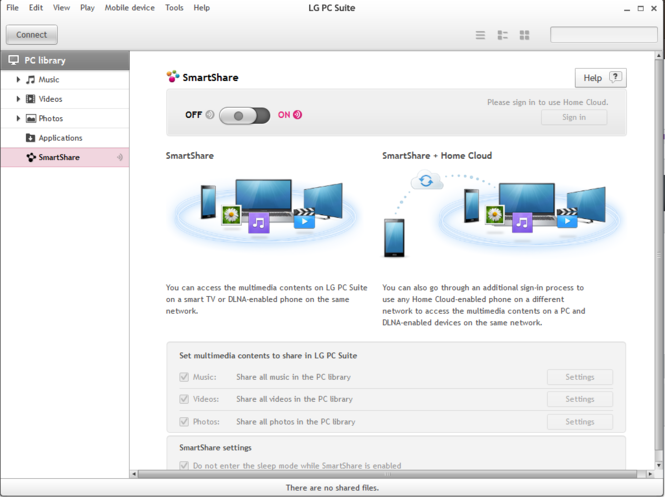
LG V30 has recently launched all over the world and has already caught the eyes of Android users. Not to mention, a bunch of iPhone users has already switched to LG V30 because it is offering way more than an iPhone does at a very reasonable price. But in any case, if you are switching for iPhone to Android then there will be one crucial question about how to transfer content from iPhone to LG V30? Needless to say, no one likes an empty contacts list or empty inbox or no multimedia files to play with. Well, you may stop worrying about that today because in this tutorial on our blog, we are going to expose few amazing tricks to transfer all data from iPhone to LG V30 effortlessly. The real issue with transferring data from iPhone to Android is that both smartphones uses different operating systems that are not compatible with each other. That�s why we are going to use few couple third party software to accomplish this task. Method 1: With LG PC Suite LG PC Suite is exclusive file man...

10 Best Tips & Tricks of Xiaomi Mi A1

Image
Hello guys in today's post I will be showing you 10 amazing tips and tricks for Xiaomi Mi A1 Device device, as you might know that Xiaomi has recently launched its flagship camera smartphone at a budget price of 15K,  so let's first discuss a bit about what specifications Xiaomi Mi A1 is offering to us. The Xiaomi Mi A1device comes with a 5.5 inch full HD IPS display with a resolution of 1920x1080,  along with this  phone has 4 GB of RAM and 64 GB of internal storage which can be further expanded upto 128 GB using a microSD card,  but unfortunately Xiaomi Mi A1 device also comes with a hybrid sim slot, so you can either use one sim and one micro SD card or two Sim cards at the same time, the device runs on Qualcomm Snapdragon 625 processor which is clocked at 2.02 gigahertz with 14nM FinFet technology which is a very power efficient chipset, the android version on this device is Nougat 7.1.2, and it will get updated very fast as xiaomi and google has promis...

How To Turn on Android Microphone Remotely

Image
What if you could listen to the gossips of your employees or could know what your spouse talks about you in your absence? Well, this is no more impossible. You can secretly listen to the conversations of your employees and your family even when you are far away from them. The technology has made it practical to be virtually present anywhere and anytime. There are certain Android Spy Apps that let you track your family and business personnel and enable you to listen to their conversations, track their locations, and monitor their online and offline activities. These apps also let you control the Android mobile phone of someone and perform certain functions such as activating the microphone or camera of the device without accessing it to listen and record the happenings of the device user. This article discusses how you can remotely activate an Android phone�s microphone to listen and record the conversations of someone. How Does Android Spy App Work? First, download and install the spy ...

Trick : Activate FM Radio on Xiaomi Mi A1

Image
Hi guys in today's post I will be showing you that how to enable or activate FM radio on Xiaomi Mi A1 device, as we all know Xiaomi has partnered with Google under Android one program and launched their first first Android phone Xiaomi Mi A1 in the Global market, and they have disabled FM radio app on this device because of some issues in countries like US and Canada, but we can activate FM radio on Xiaomi Mi A1 by using a simple trick which I am going to show you. How to get FM Radio on Xiaomi Mi A1 Method 1: (Simple One) Dial *#*#6484#*#* on your Xiaomi Mi A1, and it will open Hardware Test Mode on Your Device,  Now Just Scroll Down to the Bottom and Your will find FMRadio option, Just tap on that, and it will ask to insert earphone, just plug in the earphone and navigate the channels with the backward and forward button appeared on your device. Method 2: (A bit Time Consuming) Download activity launcher from Google Play Store (you can uninstall this app after FM activation) ...